
A post-purchase details box
The optional Thank you extension displays saved invoice information after checkout. Depending on the order and available fields, that can include VAT number, company name, tax office, address and country. It displays information; it does not issue or certify a tax document.
This box is available on every Shopify plan, including Basic. That differs from the VAT form inside checkout, which requires Shopify Plus. On other plans, collect the details on a product page or in the cart before showing them after purchase.
Add it to the Thank you page
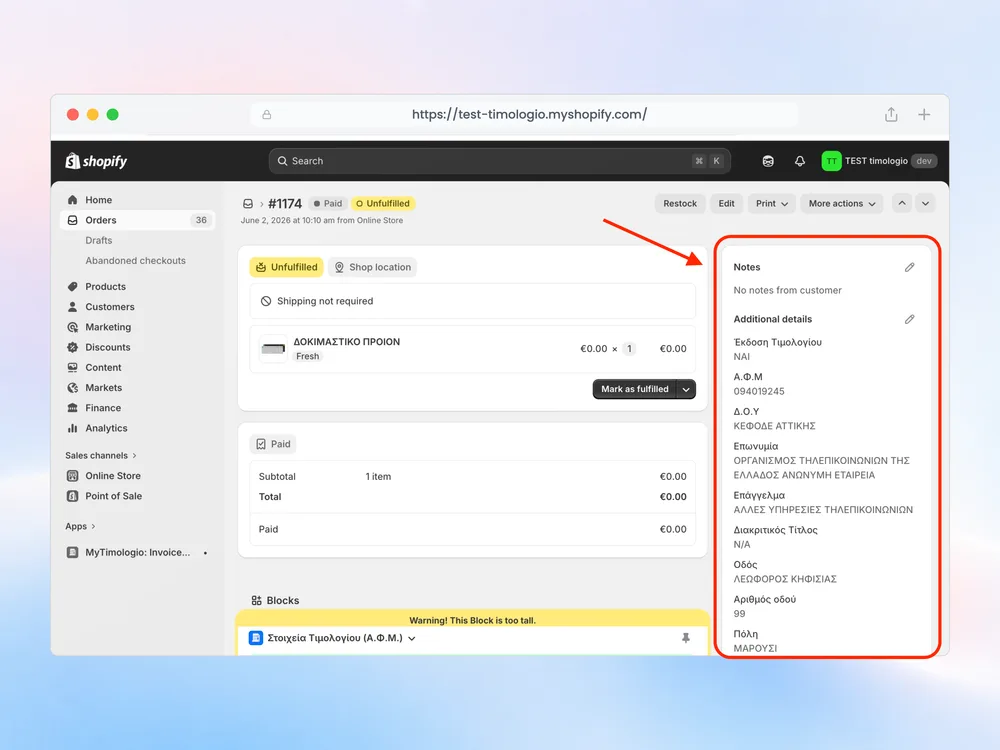
Open MyTimologio settings and use the option to add the invoice details box to the Thank you page. Add the block in Shopify’s editor and save the configuration. Place a test order that requests an invoice, then compare the displayed values with the order’s Additional details.
Test a receipt order too. Do not assume an invoice-only test proves the correct experience for every buyer. If the information is missing, trace back to whether the customer passed through your collection form and whether the order contains the expected attributes.
Keep the next step visible to your team
The customer-facing box is separate from the handoff to commercial-management software. Your ERP or provider still reads the saved order fields and issues the actual document. A Thank you display should not be used as evidence that the provider has received or issued anything.
See installation for the full sequence and order field mapping for the information your provider needs to read.
Related questions
Does the Thank you box work without Plus?
Yes. The optional Thank you box displays saved invoice details on every Shopify plan, including Basic. It is a post-purchase display, not a replacement for collecting details before purchase. Add it through the Thank you page editor and test both an invoice order and a receipt order.
Can Basic pre-fill the company name and address in checkout?
No. On non-Plus plans Shopify does not allow apps to fill checkout fields. The form inside checkout requires Plus. On Basic and other plans the product or cart form saves invoice details in the order’s Additional details. They remain unchanged even when the customer chooses a different shipping address. An optional thank-you block is also available.
Where are the details saved on the order?
They are saved as Shopify order custom attributes, displayed in Additional details. Exact Greek keys include «Έκδοση Τιμολογίου», «Α.Φ.Μ», «Επωνυμία», «Δ.Ο.Υ», «Οδός», «Αριθμός οδού», «Πόλη», «Τ.Κ» and «Χώρα». These storage keys remain Greek even when the customer interface is in another language.